go-lb
go-lb is a simple, custom load balancer written in Go
 go-lb
go-lb
go-lb is a simple, custom load balancer written in Go. It uses a round-robin load balancing strategy to send requests into a set of servers with support for concurrent request handling. It also performs active and passive health checks of servers.
Table of Contents
Features
- Round-Robin Scheduling: Distributes requests evenly across all healthy backend servers.
- Active Health Checks: Periodically pings backends to verify their status and automatically removes unhealthy servers from the pool.
- Concurrency: Efficiently handles concurrent requests.
Getting Started
Prerequisites
- Go 1.23 or higher
Installation
-
Clone the repository:
git clone https://github.com/kpraveenkumar19/go-lb.git cd load-balancer -
Build the project:
You can build the binaries for the load balancer and the mock server using the standard Go build command.
# Build the Load Balancer
go build -o bin/lb ./lb

# Build the Mock Server
go build -o bin/server ./server
Usage
You can run the project either using the provided automated script or by manually starting the components.
Running with Test Script
The easiest way to see the load balancer in action is to use the test_run.sh script. This script builds the binaries, spins up multiple backend servers, starts the load balancer, runs test requests, and then cleans up.
-
Make the script executable:
chmod +x test_run.sh -
Run the script:
./test_run.shWhat happens:
- Kills any existing instances of
lborserver. - Builds the project.
- Starts 3 backend servers on ports
8081,8082, and8083. - Starts the Load Balancer on port
3030. - Sends sequential and concurrent
curlrequests to demonstrate load balancing. - Shuts down all processes.
- Kills any existing instances of
Manual Setup
If you prefer to run components individually:
-
Start Backend Servers:
Open separate terminals or run in the background:
Flag Description --nameName of the server --portPort for the load balancer to listen on (default: 8080). ./bin/server -port 8081 -name "Server-1" & ./bin/server -port 8082 -name "Server-2" & ./bin/server -port 8083 -name "Server-3" & -
Start the Load Balancer:
Open separate terminal or run in the background:
Flag Description --backendsComma-separated list of backend URLs. --portPort for the load balancer to listen on (default: 3030). ./bin/lb -port 3030 -backends "http://localhost:8081,http://localhost:8082,http://localhost:8083" -
Send Requests:
Use
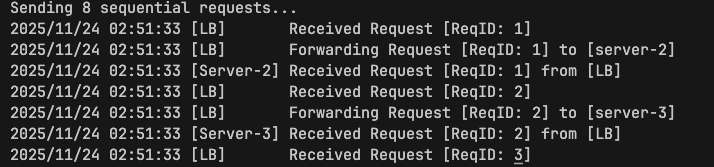
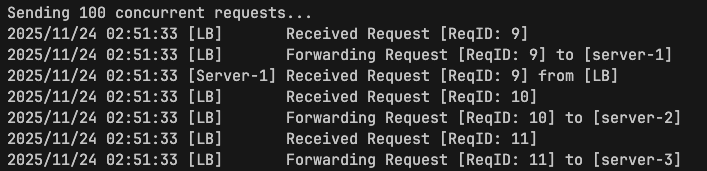
curlto send traffic to the load balancer:# "------------------------------------------------" # "Test 1: Sequential Requests" # "------------------------------------------------" echo "Sending 8 sequential requests..." for i in {1..8}; do curl -s "http://localhost:3030" done # "------------------------------------------------" # "Test 2: Concurrent Requests" # "------------------------------------------------" echo "Sending 100 concurrent requests..." ( for i in {1..100}; do curl -s "http://localhost:3030" & done wait )Check the output logs of the load balancer and servers to see the request distribution. Below is an example of how logs will look like :
Contributing
Contributions are welcome! To propose changes:
- Fork the repository and create a feature branch
- Make your changes
- Open a Pull Request with a clear description and examples